Frequently asked questions
Why do some requests from Google Cloud return HTTP 403 while the same requests work from another network?
If your integration runs on Google Cloud, such as Cloud Run or Cloud Functions, it may send requests from different outbound IP addresses. Some of those addresses may be blocked because of their reputation, causing intermittent HTTP 403 Forbidden responses even when your credentials are valid.
You may notice that:
- The same query and access token work from another network.
- Failed requests return HTTP
403without a GraphQLerrorsarray or arequest_id. - Token requests to
/auth/tokenor/auth/refreshalso return HTTP403from the affected environment.
This pattern can indicate an issue with the outbound IP address. It does not necessarily mean that your token is invalid or that your query has exceeded its credit quota. For credit and request-rate errors, see Throttling & Quotas.
How can I resolve this?
Configure your integration to use a static outbound IP address so its API requests consistently originate from the same address.
- Follow Google’s Static outbound IP address guide for Cloud Run. If you use Cloud Functions, choose the networking configuration appropriate for your function’s generation.
- Verify that requests from your deployed integration use the configured static IP address. Apply this configuration to both GraphQL and authentication requests.
- Retry a request to the ShipHero Public API from that environment.
A static IP address can still be blocked if it has a poor reputation. If HTTP 403 responses continue, contact ShipHero Support with the details below. You may need to use a different static outbound IP address.
Refreshing a valid token or repeatedly retrying the same request will not resolve a blocked outbound IP address.
What should I include when contacting support?
Please provide:
- Your ShipHero account ID.
- The outbound public IP address or addresses used by your integration.
- The timestamps of failed requests, including the time zone, preferably UTC.
- The affected endpoint and HTTP status code.
- Whether the same request succeeds from another network, and a successful
request_idif available.
You can report the issue even if failed requests have no request_id. Do not include access tokens, refresh tokens, or passwords.
Why does the API return “User does not have permissions to access data exports”?
This error means that the user associated with your API request does not have permission to query Data Exports. An administrator must enable Data Exports for that user.
How can I resolve this?
Ask an administrator on your ShipHero account to follow the steps below for the user making the API request.
Regular users
- Sign in to ShipHero Shipping and open the users page.
- Find the user making the API request and click their name to edit their settings.
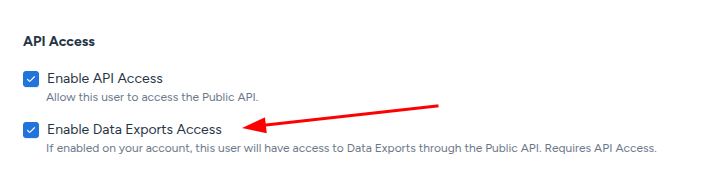
- Scroll to the bottom of the page to find the API Access section.
- Select Enable Data Exports Access, then save the changes.
Developer users
- Sign in and open the users page.
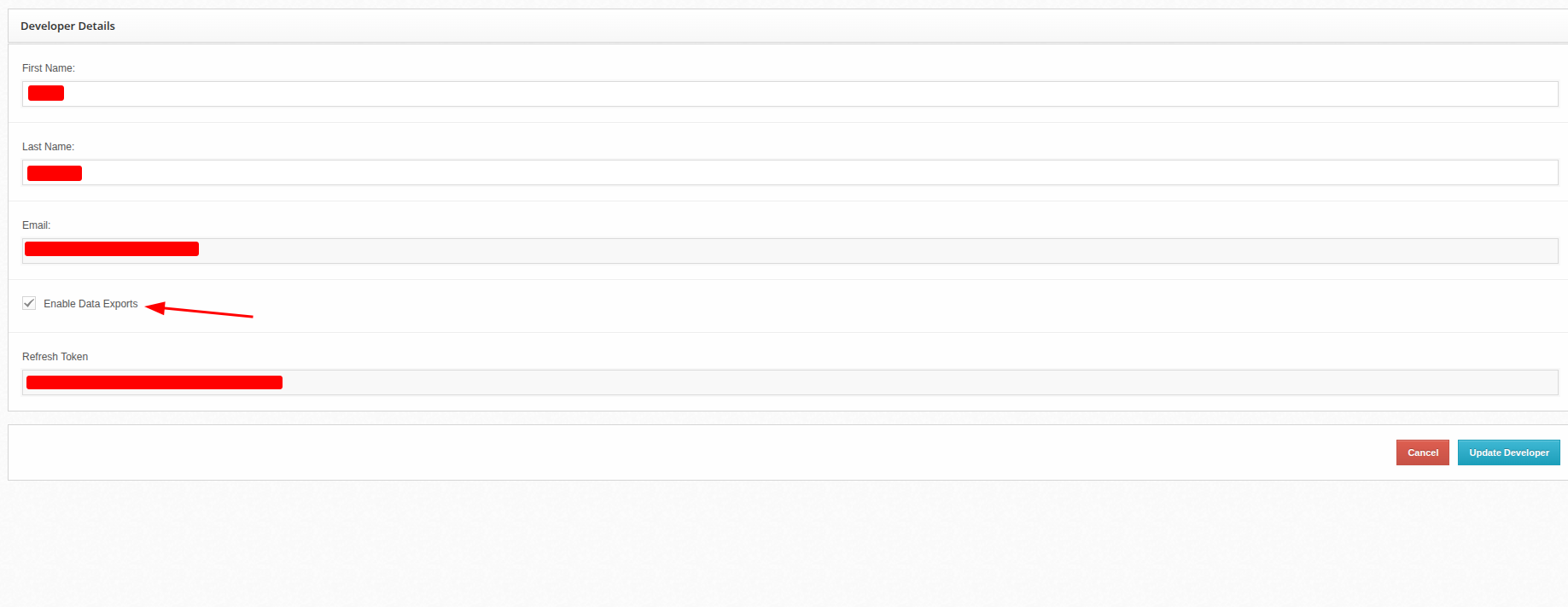
- Find the developer user making the API request and click Edit under that user.
- In Developer Details, select Enable Data Exports.
- Click Update Developer to save the changes.
After saving the changes, retry the Data Exports query using that user’s credentials.
Why do some shipping labels never show tracking updates?
ShipHero fills tracking_status, delivered and picked_up on each ShippingLabel by polling the carrier. When the label’s carrier is not covered by that pipeline, tracking_status stays UNKNOWN and delivered and picked_up stay null, no matter how long ago the label was created. The request itself succeeds with HTTP 200 and returns no GraphQL errors array, so this is not a problem with your query, your credentials, or the user’s permissions.
The shipments query returns these fields on every label it reports. tracking_status returns one of six values. UNKNOWN, PRE_TRANSIT and TRANSIT mean the label is still in flight; DELIVERED, RETURNED and FAILURE are final and will not change again. The schema types the field as String, so these values do not appear in the schema reference.
Three different situations return UNKNOWN:
- The carrier has no tracking integration yet. Amazon Shipping is the most common case, returned by the API with the carrier
amazon_shipping_api_v2. Generic labels (genericlabel) have no carrier to poll at all. - The carrier’s tracking is temporarily unavailable. Tracking depends on each carrier’s own API, so when that API is retired or stops responding, labels for that carrier stop updating until the integration is rebuilt. USPS retiring its Web Tools API, which also affected Shippo labels, is one example.
- The label has not been scanned yet. For a fully supported carrier,
tracking_statusisUNKNOWNuntil the carrier’s first scan. This one resolves on its own.
Tracking is currently ingested for ups, fedex, dhl_ecommerce, usps_modern, canada_post, canpar, purolator, asendia_one, uni_uni, veho, blue_streak, ontrac, osm, gofo, xdelivery, doordash and international_bridge. Any carrier outside that list returns UNKNOWN.
How can I resolve this?
Use the label’s tracking_number and tracking_url to track the shipment with the carrier directly. Carriers such as UPS accept a public tracking lookup with no account, so this is often faster than waiting for ShipHero to refresh.
No webhook fires when a tracking status changes: the Shipment Update webhook fires once when the order is fulfilled and gives you the tracking number for each package. If you poll instead, query only the labels that are not yet in a final status and stop once they get there. The underlying data refreshes about hourly, so polling faster than that gains nothing.
Check the Changelog for the announcement when a carrier’s tracking becomes available.